Why Is It So Hard to Center a <div>? The Famous Programmer Joke Explained

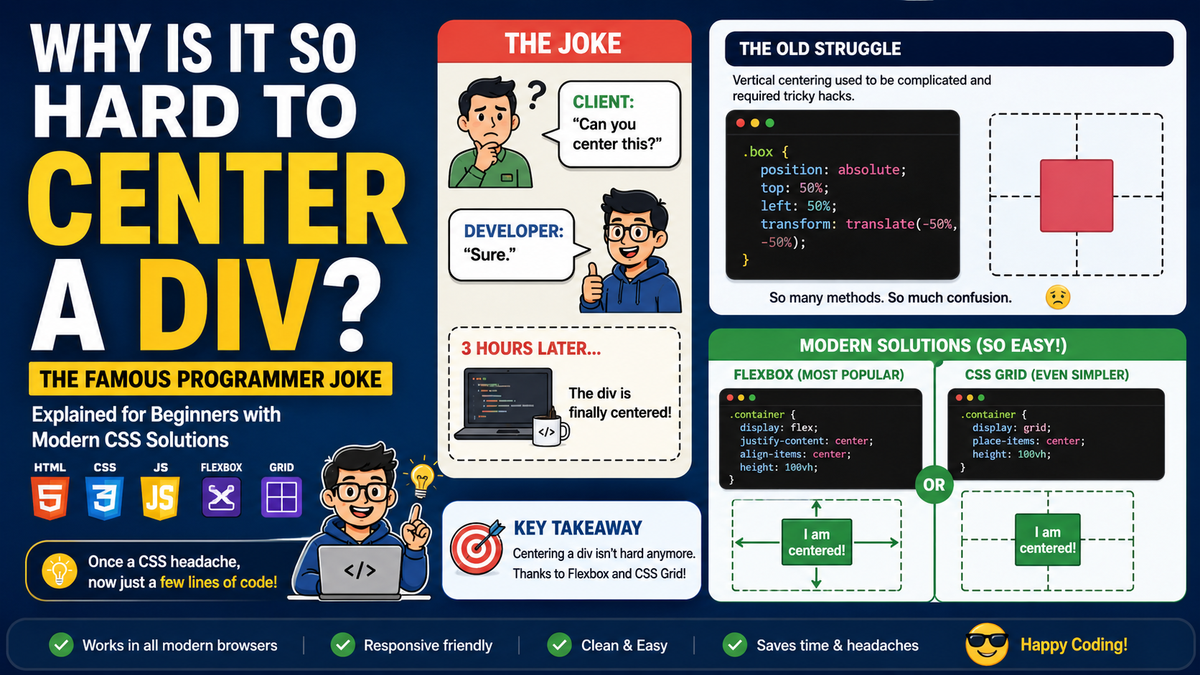
If you have spent any time learning HTML and CSS, you have probably encountered the famous developer joke:
“Why is it so hard to center a div?”
At first, this sounds ridiculous. After all, placing something in the center of a page seems like one of the simplest tasks in web design.
Yet for many years, centering a <div> was a genuine CSS headache. The joke became popular because developers could spend more time trying to center an element than building the actual website feature.
Today, modern CSS has made the task much easier. But the joke remains a legendary part of web development culture.
What Is a <div>?
Before understanding the joke, it helps to understand what a <div> is.
The HTML <div> element is a general-purpose container used to group other HTML elements.
For example:
<div class="card">
    <h2>Welcome</h2>
    <p>This content is inside a div.</p>
</div>
A <div> can contain:
- Text
- Images
- Buttons
- Forms
- Headings
- Other
<div>elements - Almost any other HTML element
By itself, a <div> does not have a special visual appearance. CSS controls how it looks and where it appears.
Why Is Centering a <div> a Joke?
The famous joke comes from the fact that horizontal centering and vertical centering historically required very different techniques.
Centering something horizontally was relatively easy:
.box {
    width: 300px;
    margin: 0 auto;
}
But vertical centering was often much more complicated.
Developers had to ask questions such as:
- Is the parent container a fixed height?
- Is the content responsive?
- Is the element inline or block-level?
- Should the content be centered horizontally, vertically, or both?
- Is the page using an old browser?
- Is the content's height known?
The answer often resulted in a completely different CSS solution.
That is where the comedy began.
The Classic Programmer Experience
A beginner might write:
div {
    text-align: center;
}
Then wonder:
“Why is my div still not in the center?”
The problem is that:
text-align: center;
usually centers inline content inside an element. It does not necessarily center the <div> itself.
Then the developer tries:
margin: auto;
Sometimes it works.
Sometimes it does not.
Then they add:
position: absolute;
Then:
top: 50%;
left: 50%;
Then the box is not quite centered.
So they add:
transform: translate(-50%, -50%);
At this point, the developer has written five lines of CSS just to center one box.
The famous CSS ritual has begun. 🧙♂️
The Old Way of Centering a <div>
One common technique was:
.box {
    position: absolute;
    top: 50%;
    left: 50%;
    transform: translate(-50%, -50%);
}
This works because:
top: 50%;
left: 50%;
moves the top-left corner of the element to the center of the page.
However, the element itself is still offset because its top-left corner, not its center, is positioned at the center.
This is why:
transform: translate(-50%, -50%);
is added.
It moves the element backward by half of its own width and height.
The result is a genuinely centered element.
The Modern Way: Flexbox
Today, the easiest and most popular way to center a <div> is usually Flexbox.
HTML:
<div class="container">
    <div class="box">
        I am centered!
    </div>
</div>
CSS:
.container {
    display: flex;
    justify-content: center;
    align-items: center;
    height: 100vh;
}
Let's break it down.
display: flex
This turns the parent container into a Flexbox container.
display: flex;
justify-content: center
This centers the content along the main axis.
justify-content: center;
align-items: center
This centers the content along the cross axis.
align-items: center;
height: 100vh
This gives the container the height of the entire viewport.
height: 100vh;
Together, these properties can center a box both horizontally and vertically.
Complete Flexbox Example
<!DOCTYPE html>
<html>
<head>
    <style>
        .container {
            height: 100vh;
            display: flex;
            justify-content: center;
            align-items: center;
        }

        .box {
            width: 300px;
            padding: 30px;
            text-align: center;
            border: 1px solid #ccc;
        }
    </style>
</head>
<body>

    <div class="container">
        <div class="box">
            Centered content
        </div>
    </div>

</body>
</html>
This is one of the simplest modern ways to center content on a webpage.
CSS Grid Makes It Even Simpler
CSS Grid can also center a <div>.
.container {
    display: grid;
    place-items: center;
    height: 100vh;
}
The place-items: center property centers the content both horizontally and vertically.
This is beautifully short:
place-items: center;
For many situations, this is one of the cleanest modern solutions.
Why Did the Problem Become So Famous?
The problem became a popular programming joke because developers often encounter situations where:
The task is easy in theory but strangely complicated in practice.
A non-programmer might say:
“Just put the box in the middle.”
A developer might respond:
“Horizontally or vertically?”
Then:
“Relative to the viewport or its parent?”
Then:
“What happens on mobile?”
Then:
“What browser are we supporting?”
And suddenly, the simple box has become a full engineering project. 😄
The Famous CSS Meme
One of the most popular developer memes is essentially:
Client:
“Can you center this?”
Developer:
“Sure.”
Three hours later:
The <div> is finally centered.
This is funny because it reflects a real experience from older CSS development.
Why Was Vertical Centering Historically Difficult?
Older CSS was designed primarily around document flow.
Elements naturally appeared:
- From top to bottom
- From left to right
The web was originally designed more for displaying documents than creating modern application interfaces.
As a result, CSS did not initially provide simple tools specifically designed for:
“Put this object exactly in the center of its container.”
Developers had to use creative workarounds.
These included:
1. Absolute Positioning
.box {
    position: absolute;
    top: 50%;
    left: 50%;
    transform: translate(-50%, -50%);
}
2. Auto Margins
.box {
    width: 300px;
    margin: 0 auto;
}
3. Table Layout
Older websites sometimes used table-style layouts:
.container {
    display: table-cell;
    vertical-align: middle;
    text-align: center;
}
This worked, but it was not exactly elegant.
4. Line Height Tricks
For a single line of text, developers sometimes used:
.box {
    height: 100px;
    line-height: 100px;
}
This could vertically center text, but it was not suitable for multi-line content.
5. JavaScript
In particularly complicated situations, developers sometimes used JavaScript to calculate the position of an element.
Imagine using JavaScript to center a box.
For some developers, that was the moment they started questioning their career choices. 🤣
Why margin: auto Does Not Always Work
Many beginners expect this to center everything:
margin: auto;
But it does not automatically center an element vertically in every situation.
For horizontal centering, the element usually needs a defined width:
.box {
    width: 300px;
    margin: 0 auto;
}
Without a width, a block element may already occupy the full available width, so there may be no visible horizontal movement.
Vertical centering requires a different layout context or technique.
This difference is one reason beginners often find CSS confusing.
Is Centering a <div> Still Hard Today?
Not usually.
Modern CSS has solved much of the problem.
The most popular approaches are:
Flexbox
.parent {
    display: flex;
    justify-content: center;
    align-items: center;
}
CSS Grid
.parent {
    display: grid;
    place-items: center;
}
Horizontal Centering with Auto Margins
.box {
    width: 300px;
    margin: 0 auto;
}
Modern CSS has essentially turned the old problem from:
“Which ancient CSS spell do I need?”
into:
display: flex;
justify-content: center;
align-items: center;
Much better. ✨
The Joke Still Lives On
Even though centering a <div> is much easier today, the joke remains popular because it represents something larger about programming.
Programming is full of tasks that sound simple:
- “Just center the box.”
- “Just add a button.”
- “Just make the website responsive.”
- “Just connect the database.”
- “Just fix the small bug.”
The word “just” is often the beginning of a long adventure.
The centered <div> became a symbol of that experience.
Final Thoughts
The phrase “Why is it so hard to center a div?” is both a programmer joke and a reference to a real historical problem in CSS.
In the early days of web development, centering content, especially vertically, could require complicated techniques and browser-specific workarounds.
Today, developers can usually use:
display: flex;
justify-content: center;
align-items: center;
or:
display: grid;
place-items: center;
So, no, centering a <div> is not really hard anymore.
But programmers will probably continue joking about it forever.
Because in web development, the box may be centered in the browser...
…but the developer's patience is still somewhere around left: -500px. 😂🧱