KUCCPS Inter-Institutional Transfer Application 2026: How to Change Your University or College

Students placed by the Kenya Universities and Colleges Central Placement Service (KUCCPS) who wish to change their institution or programme can apply for an Inter-Institutional Transfer (IIT) through the KUCCPS Student’s Portal.
The transfer process is designed for students who have already been placed in universities or colleges but would like to move to another institution. In some cases, students may also request a change of programme, provided they meet the applicable cut-off points and other requirements.
Access the KUCCPS Student’s Portal
Students can access the KUCCPS Student’s Portal through:
The portal dashboard provides access to institutions, programmes, applications, transfers and other KUCCPS services.
The dashboard also displays available learning institutions and programmes, including:
- Public universities
- The Open University of Kenya
- Private universities
- Public colleges
- TVET institutions
- Colleges under other ministries
- KMTC and other eligible institutions
The specific institutions and programmes available to a student may depend on eligibility, qualifications, cut-off points and the current KUCCPS placement cycle.
Who Can Apply for an Inter-Institutional Transfer?
The Inter-Institutional Transfer application is intended for students who:
- Have been placed in a university or college through KUCCPS.
- Wish to change their current institution.
- Wish to change their course or programme, where applicable.
- Meet the required cut-off points for the programme they are seeking to join.
- Have a valid reason for requesting the transfer.
A transfer is not automatically approved. The application must go through the required endorsement and approval process.
How to Apply for KUCCPS Inter-Institutional Transfer
Follow these steps to submit your transfer application.
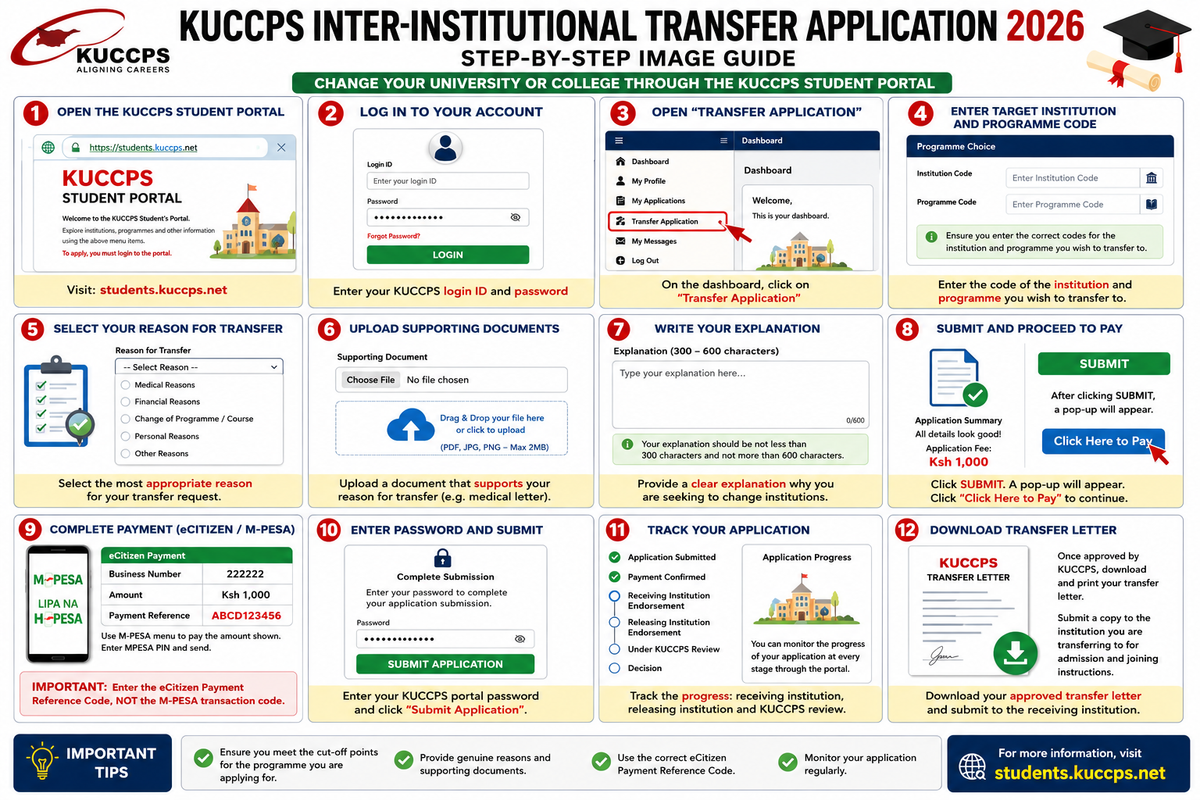
Step 1: Log in to the KUCCPS Student’s Portal
Visit:
students.kuccps.net
Log in using your KUCCPS Student’s Portal credentials.
Once successfully logged in, you will be taken to your dashboard.
Step 2: Open the Transfer Application Section
From the dashboard, click on the “Transfer Application” tab.
This will open the online Inter-Institutional Transfer application form.
Step 3: Enter the Institution and Programme Code
Enter the code of the institution and programme that you wish to transfer to.
Students should ensure that they select the correct institution and programme before proceeding with the application.
Where a programme change is involved, the applicant must meet the applicable requirements and cut-off points.
Step 4: Select Your Reason for Transfer
Choose the reason why you are seeking an inter-institutional transfer.
Depending on the reason selected, you may be required to provide supporting documentation.
For example, a student applying for transfer due to medical reasons may be required to attach a document or letter from a recognised health facility or medical professional.
Step 5: Attach Supporting Documents
Upload a document supporting your reason for requesting the transfer.
Examples may include:
- Medical documentation where applicable.
- Other official documents supporting the reason given.
Make sure the uploaded document is clear and readable.
Step 6: Write Your Transfer Explanation
You will be required to provide a brief explanation explaining why you wish to change your institution or programme.
The explanation should be:
- Not less than 300 characters
- Not more than 600 characters
The explanation should clearly and honestly state the reason for your transfer request.
Avoid submitting an explanation that is too short or exceeds the character limit.
Step 7: Pay the Transfer Application Fee
Proceed to make the required payment of Kshs. 1,000 using the payment instructions provided on the portal.
After clicking the Submit button, a payment pop-up will appear.
Click the “Click Here to Pay” link to proceed to the eCitizen payment page.
KUCCPS Transfer Payment Procedure
After clicking the payment link, you will be redirected to the eCitizen payment instructions page.
Select your preferred payment method and follow the instructions provided.
Paying Through M-PESA
For M-PESA payments, the payment instructions will display the required details, including:
- The Business Number
- The Payment Reference Code
- The amount to be paid
The instructions provided indicate the KUCCPS payment Business Number as:
222222
Use the M-PESA menu on your phone to make the payment according to the instructions displayed on the portal.
After completing the payment, enter your eCitizen Payment Reference Code in the required field.
Important: Do Not Use the M-PESA Transaction Code
Students should be careful when submitting the payment details.
The KUCCPS transfer application requires the eCitizen Payment Reference Code.
Do not enter the M-PESA transaction code in place of the eCitizen Payment Reference Code.
Keep the payment reference safely because it may be required for subsequent changes to the application.
Step 8: Submit Your Transfer Application
After entering the correct eCitizen Payment Reference Code, click Submit.
You will then be required to enter your KUCCPS Student’s Portal password to complete the application submission.
Use the same password you use to log in to the KUCCPS Student’s Portal.
After a successful submission, the application page will display a flow chart that allows you to track the progress of your transfer application.
KUCCPS Transfer Approval Process
The transfer application passes through several stages.
1. Application Submission
The student submits the transfer application through the KUCCPS Student’s Portal.
2. Receiving Institution Endorsement
The institution the student wishes to join must endorse the transfer application.
If the receiving institution declines to endorse the application, the student will be notified through the portal.
The student may then be advised to consider another programme or institution.
3. Releasing Institution Endorsement
The institution where the student was originally placed must also endorse the transfer application.
Both the receiving and releasing institutions play a role in the transfer process.
4. KUCCPS Review and Approval
After the required institutional endorsements have been completed, the application moves to KUCCPS for consideration.
KUCCPS then reviews the transfer request and makes the final decision.
How to Track Your KUCCPS Transfer Application
After successfully submitting the application, students can monitor the progress of the transfer through the KUCCPS Student’s Portal.
The application flow chart may show the progress of the request, including the endorsement stages and KUCCPS processing.
Students are encouraged to regularly log in to the portal and check for updates.
What Happens After KUCCPS Approves the Transfer?
Once the transfer application has been approved by KUCCPS, the student should:
- Log in to the KUCCPS Student’s Portal.
- Download the approved transfer letter.
- Print the transfer letter.
- Submit a copy to the institution the student is transferring to.
- Follow the institution's instructions for obtaining the admission letter and joining instructions.
The receiving institution will then guide the student on the next steps for admission and reporting.
Important Tips for KUCCPS Transfer Applicants
Before submitting your application, make sure that:
- You have selected the correct institution and programme.
- You meet the applicable programme requirements and cut-off points.
- Your reason for transfer is genuine and clearly explained.
- Your supporting document is clear and relevant.
- Your explanation is between 300 and 600 characters.
- You pay the correct transfer application fee.
- You use the eCitizen Payment Reference Code, not the M-PESA transaction code.
- You keep your payment reference details safely.
- You remember your KUCCPS Student’s Portal password.
- You regularly monitor your application status.
KUCCPS Transfer Deadline
The KUCCPS Student’s Portal displays the remaining time before the transfer application deadline.
Applicants should always check the live countdown displayed on the official portal because deadlines may change depending on the application cycle and official KUCCPS announcements.
Do not wait until the final day to submit your application. Payment delays, portal traffic and errors in the application can affect your ability to complete the process on time.
Frequently Asked Questions
How much does a KUCCPS inter-institutional transfer cost?
The transfer application fee is Kshs. 1,000, according to the payment instructions provided on the portal.
Can I change both my institution and course?
The Inter-Institutional Transfer process may also allow a programme change, provided the applicant meets the applicable cut-off points and programme requirements.
What document should I attach to my transfer application?
Attach a document that supports your stated reason for transfer. For example, medical-related applications may require supporting documentation from a recognised health facility or medical professional.
How long should my transfer explanation be?
The explanation should contain between 300 and 600 characters.
Which payment code should I enter after paying?
Enter the eCitizen Payment Reference Code. Do not use the M-PESA transaction code.
Can I track my application after submitting it?
Yes. After successful submission, a flow chart is displayed on the application page to help you track the progress of your transfer application.
What happens if the receiving institution rejects my application?
You will be notified through the KUCCPS Student’s Portal and may be advised to try another programme or institution.
=============================
The KUCCPS Inter-Institutional Transfer process provides a formal way for eligible students to request a change of institution or, where applicable, programme.
Applicants should carefully complete every section of the application, provide genuine supporting information, use the correct payment reference, and monitor their application through the KUCCPS Student’s Portal.
For the latest application status, available programmes, transfer deadlines and official instructions, visit the KUCCPS Student’s Portal at students.kuccps.net.
Disclaimer: KUCCPS application requirements, deadlines, available programmes and portal instructions may change. Students should always confirm the latest information directly through the official KUCCPS Student’s Portal and official KUCCPS communications.