How to Join Moi University Through KUCCPS: Online Application and Registration Guide

Are you a student who has been placed at Moi University through the Kenya Universities and Colleges Central Placement Service (KUCCPS)? The next step is to complete your online admission and registration process through the Moi University admissions portal.
Moi University allows Government Sponsored Students to confirm their placement online and access other admission services through the official admissions portal.
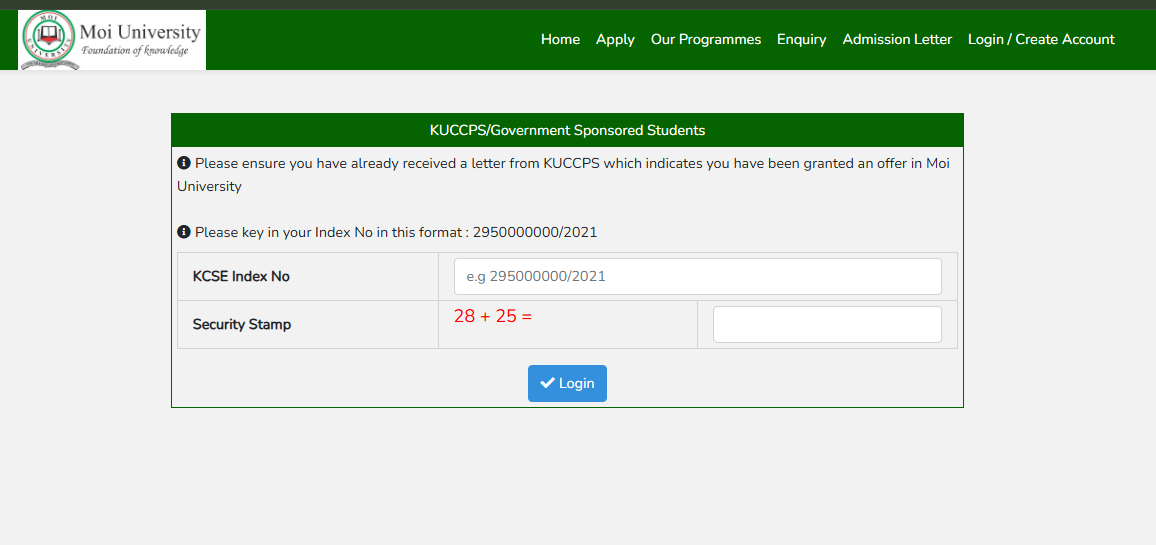
Moi University KUCCPS Admission Portal
Government-sponsored students should use the official Moi University online admissions portal to begin the process.
Visit the official portal: https://admissions.mu.ac.ke/
Requirements Before You Begin
Before attempting to log in, make sure that:
- You have received an invitation or placement to Moi University through KUCCPS.
- You have your KCSE Index Number.
- You have access to a reliable internet connection.
- Your personal details are available for completing the registration process.
According to the portal, KUCCPS students must have received an offer to Moi University before attempting to log in.
Step-by-Step Guide for KUCCPS Students
Step 1: Confirm Your KUCCPS Placement
First, confirm that KUCCPS has placed you at Moi University.
You should have received an invitation or placement indicating that you have been offered a programme at the university. If you have not been placed at Moi University, you may not be able to access the Government Sponsored Students section of the portal.
Step 2: Visit the Moi University Admissions Portal
Open the official Moi University admissions website:
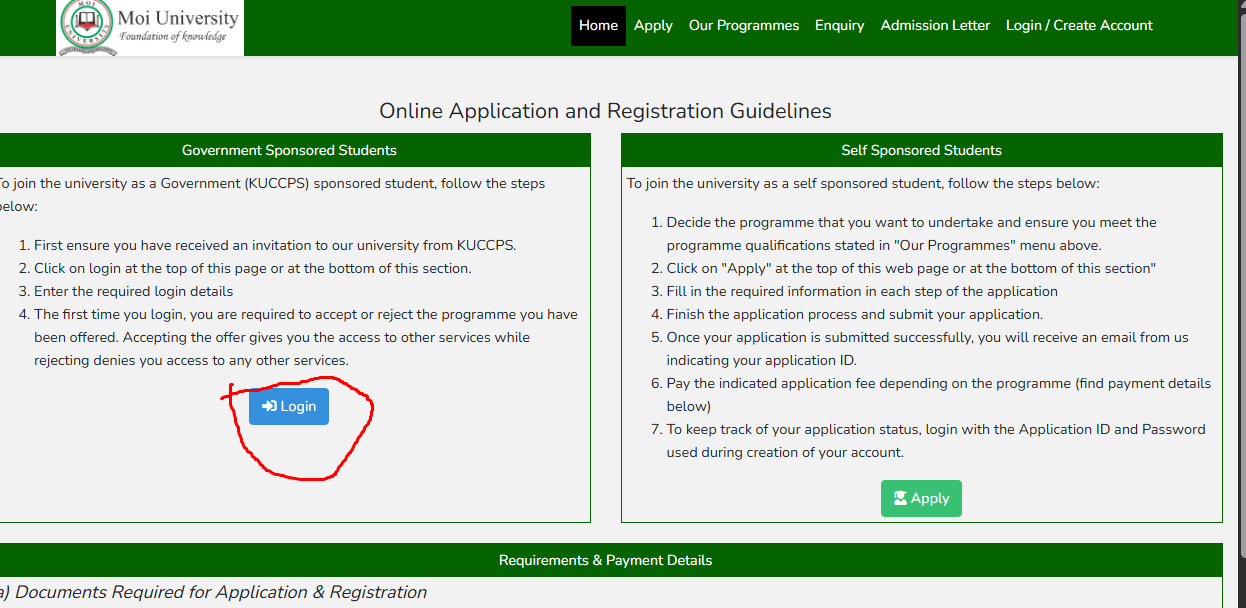
On the portal, click the Login option.
Step 3: Select the Government Sponsored Students Login
The login page provides a dedicated section for Government Sponsored Students admitted through KUCCPS.
You will be required to enter your KCSE Index Number in the format requested by the portal.
For example, the portal displays an index number format similar to:
2950000000/2021
Make sure you enter your KCSE Index Number correctly before proceeding.
Step 4: Enter Your Login Details
Enter the required information and complete the security verification displayed on the page.
After entering the correct details, click Login.
Step 5: Accept or Reject Your Programme Offer
When you log in for the first time, you will be required to make a decision regarding the programme you have been offered.
You can either:
- Accept the offer, or
- Reject the offer
Important: Accepting the Offer
If you accept the programme offered to you, you will gain access to other services available through the university's online admission and registration system.
If you reject the offer, the portal indicates that you will not be able to access the other services available to students through the system. Therefore, students should carefully review their placement details before making their decision.
What Happens After Accepting the Offer?
After accepting your offer, you can proceed with the next admission and registration steps provided through the university portal.
Depending on the registration stage and instructions provided by Moi University, you may be required to:
- Confirm your personal details.
- Provide additional student information.
- Complete registration details.
- Follow instructions regarding admission and university registration.
- Access other available student services through the portal.
The university may also provide additional instructions for newly admitted students through its official communication channels.
Important Tips for KUCCPS Students
1. Use the Official Portal
Always access the Moi University admissions system through the official university portal:
Avoid entering your personal information into unofficial websites or portals claiming to process Moi University admissions.
2. Enter Your KCSE Index Number Correctly
A small error in your KCSE Index Number can prevent you from logging in. Enter the number exactly as it appears on your official examination documents.
3. Confirm Your Programme Before Accepting
Review the programme displayed on the portal before accepting the offer. Once you accept the offer, the system allows you to proceed to other services.
4. Do Not Reject Your Offer Accidentally
The portal states that rejecting the offered programme denies access to other services available through the system. Make sure you understand the option you are selecting before submitting your decision.
5. Keep Checking Official University Updates
Admission and registration instructions may be updated as the university prepares for a new academic year. Students should regularly check official Moi University communication channels for new announcements and deadlines.
Frequently Asked Questions
How do I join Moi University as a KUCCPS student?
You must first receive an invitation or placement to Moi University through KUCCPS. Then visit the Moi University admissions portal, click Login, enter your KCSE Index Number and follow the instructions provided.
What details are required to log in?
Government-sponsored students are required to enter their KCSE Index Number in the format requested by the Moi University admissions portal.
What happens when I accept the programme offered?
Accepting the offer gives you access to other services available through the university's online admissions and registration system.
What happens if I reject the offer?
According to the Moi University admissions portal, rejecting the offer denies access to other services available through the system.
Where can I access the Moi University admissions portal?
You can access the official portal through the Moi University admissions website.
Conclusion
Joining Moi University as a KUCCPS Government Sponsored Student begins with confirming your placement and completing the online process through the official admissions portal. Once you have received an offer from KUCCPS, log in using your KCSE Index Number, carefully review your programme and accept the offer to proceed with the available admission and registration services.
Always use the official Moi University admissions portal and follow the latest instructions provided by the university.
Official Moi University Admissions Portal: https://admissions.mu.ac.ke/