Types of Computer Errors: Transcription, Transposition, Computation and More

Computer errors are mistakes or faults that affect the accuracy, reliability, or operation of a computer system. They can occur when data is entered, processed, stored, transmitted, or displayed. Understanding these errors helps computer users, students, programmers, and organizations improve data accuracy and prevent incorrect information.
In Computer Studies, some of the most important errors to understand are transcription errors, transposition errors, misreading errors, omission errors, insertion errors, and computational errors such as rounding, truncation, and overflow errors. Other errors occur during programming, networking, and hardware operation.
Table of Contents
- What are computer errors?
- Transcription errors
- Misreading errors
- Transposition errors
- Omission errors
- Insertion errors
- Substitution errors
- Computational errors
- Programming errors
- Input, output, and transmission errors
- Hardware and software errors
- Causes of computer errors
- Ways to prevent computer errors
- Frequently asked questions
- Conclusion
1. What Are Computer Errors?
A computer error is a mistake, defect, or unexpected condition that causes data to be incorrect, a calculation to produce an inaccurate result, a program to behave incorrectly, or a computer system to fail.
Computer errors can arise from human mistakes, faulty hardware, software defects, incorrect instructions, or problems during data communication.
For example, suppose a school administrator enters a student's marks as 68 instead of 86. If the incorrect value is processed, the resulting report may show the wrong grade.
This demonstrates an important principle in computing: Garbage In, Garbage Out (GIGO).
GIGO means that if incorrect data is entered into a computer system, the system may produce incorrect information, even when its processing operations work as designed.
Main categories of computer errors
Computer errors can be grouped into several broad categories:
- Data-entry errors: Mistakes made when entering or copying information.
- Computational errors: Mistakes or inaccuracies involving mathematical calculations.
- Programming errors: Defects in the instructions or logic of a program.
- Communication errors: Problems that affect data transmission between devices.
- Hardware errors: Faults in physical components such as RAM, storage drives, or processors.
- Software errors: Defects that affect the operation of applications or operating systems.
The following sections explain these errors in detail.
2. Transcription Errors
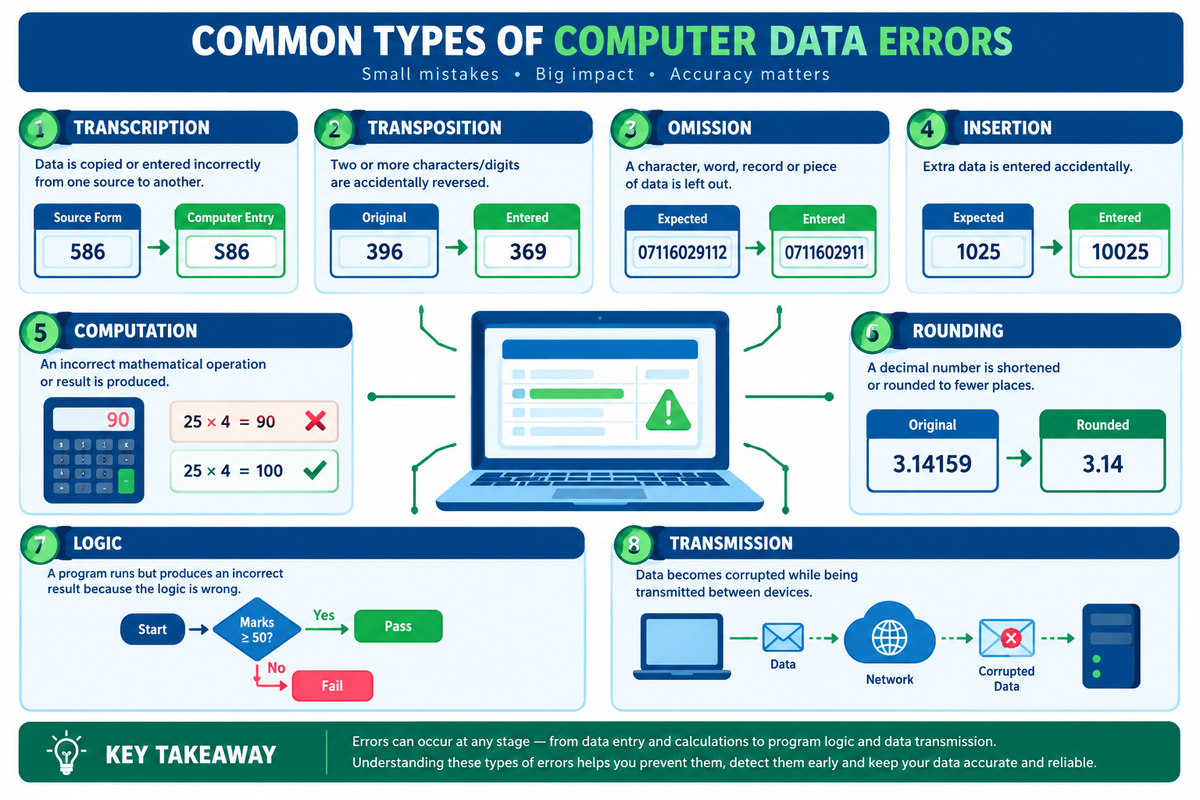
A transcription error occurs when information is copied, transferred, or entered incorrectly from one source to another.
The source may be a handwritten document, printed form, spoken message, spreadsheet, or another computer system.
Transcription errors can happen when a person types the wrong information or when a machine incorrectly recognizes text during scanning or speech transcription.
Examples of transcription errors
| Original information | Incorrect entry | Explanation |
|---|---|---|
| Mary Wanjiku | Mary Wanjikuu | An extra character is entered. |
| 586 | S86 | The digit 5 is mistaken for the letter S. |
| KSh 2,500 | KSh 25,000 | A value is entered incorrectly. |
| 15 October 2026 | 15 October 2025 | The wrong year is recorded. |
Transcription error is a broad category of data-entry mistakes. Transposition, omission, insertion, and substitution errors can be specific forms of transcription mistakes.
Causes of transcription errors
- Poor handwriting on source documents.
- Misreading letters or numbers.
- Typing too quickly.
- Incorrect keyboard use.
- Poor-quality scanned documents.
- Errors made by optical character recognition (OCR) software.
- Inaccurate speech-to-text recognition.
How to prevent transcription errors
- Compare entered information with the original document.
- Use barcode scanners or other automated data-capture devices where appropriate.
- Review important entries before saving them.
- Use verification procedures for financial records and examination marks.
- Apply validation rules to detect unusual or invalid entries.
3. Misreading Errors
A misreading error occurs when a person or data-capture system interprets information incorrectly before entering it into a computer.
It is commonly discussed as a type of transcription error in Computer Studies.
Example
Suppose a handwritten examination registration number is:
Original: 58621
The person entering the number reads the first character incorrectly and enters:
Incorrect: S8621
The letter S has been entered instead of the digit 5 because the original information was misread.
Other common examples include confusing:
- The digit 0 with the letter O.
- The digit 1 with the letter I.
- The digit 5 with the letter S.
- The digit 8 with the digit 3 in unclear handwriting.
Prevention
Use clear source documents, readable fonts, suitable scanning equipment, and careful checking of entered data. For important records, compare the final entry with the original source.
4. Transposition Errors
A transposition error occurs when two or more characters or digits are accidentally placed in the wrong order.
It is especially common when entering identification numbers, telephone numbers, account numbers, dates, and examination marks.
Why transposition errors matter
A small change in the order of characters can have serious consequences.
For example:
- A bank account number may point to the wrong account.
- A telephone number may connect to the wrong person.
- A student's registration number may be recorded incorrectly.
- A product code may identify the wrong item.
Prevention
Read numbers in small groups, compare entries with the source document, and use check digits or other verification mechanisms when supported by the system.
Exam tip: A transcription error involves incorrect copying or entry of information, while a transposition error specifically involves changing the order of characters.
5. Omission Errors
An omission error occurs when a character, digit, word, field, or entire record is accidentally left out.
Examples
| Correct information | Incorrect information | Omitted item |
|---|---|---|
| 07116029112 | 0711602911 | Final digit 2 |
| NESTICT INFOTECH | NESTICT INFOTE | Final characters |
| KSh 12,500 | KSh 12,00 | Digit 5 |
| Student registration record | No record entered | Entire record |
Omission errors may result from incomplete forms, careless typing, interrupted data entry, or software that fails to capture all the information.
Effects of omission errors
- Incomplete customer records.
- Missing examination marks.
- Incorrect invoices.
- Missing details in reports.
- Incomplete database records.
Prevention
Use mandatory fields, completeness checks, database constraints, and review procedures to ensure that all required information is captured.
6. Insertion Errors
An insertion error occurs when an extra character, digit, word, or record is added accidentally.
Examples
| Correct information | Incorrect information |
|---|---|
| 1025 | 10025 |
| Computer | Compputer |
| 0711602911 | 07111602911 |
| KSh 5,000 | KSh 50,000 |
In the first example, an extra zero has been inserted into the number.
Insertion errors can affect calculations, financial transactions, telephone numbers, and database records.
Prevention
Review entered data carefully, set reasonable input limits, and use automated checks to flag values that fall outside expected ranges.
7. Substitution Errors
A substitution error occurs when one character, digit, or value is entered in place of another.
It can happen during typing, copying, scanning, or data conversion.
Examples
| Correct entry | Incorrect entry | Substitution |
|---|---|---|
| 12345 | 12346 | 5 replaced by 6 |
| Smith | Smyth | Incorrect letter |
| 2026 | 2028 | 6 replaced by 8 |
| 500 | 800 | 5 replaced by 8 |
Substitution errors may be caused by pressing the wrong key, misreading a document, or using a faulty data-capture process.
Prevention
Use validation rules, verify critical entries, and compare the entered information against the source.
8. Computational Errors
Computational errors occur when a calculation produces a result that is different from the intended or mathematically correct result.
They may result from incorrect arithmetic, inaccurate numerical representation, inappropriate rounding, truncation, or limitations in the range of numbers a system can represent.
In traditional Computer Studies, three important computational errors are overflow, truncation, and rounding errors.
8.1 Overflow error
An overflow error occurs when a calculated value exceeds the maximum value that a particular data type or storage representation can hold.
Example: An unsigned 8-bit integer can represent values from 0 to 255. Attempting to store 300 in that data type exceeds its range.
Overflow behaviour depends on the programming language and data type. A system may raise an error, wrap around, or handle the value in another defined way.
Prevention: Select suitable data types, check calculation limits, and use appropriate overflow-handling techniques.
8.2 Truncation error
A truncation error occurs when digits or part of a value are discarded instead of being retained.
Example:
Original value: 3.14159
Truncated to two decimal places: 3.14
Truncation removes the remaining digits without rounding. The result is less precise than the original value.
Truncation can also occur when text is cut off because a field has a limited length.
Prevention: Retain sufficient precision and ensure that field sizes are appropriate for the data being stored.
8.3 Rounding error
A rounding error occurs when a number is approximated to a specified number of decimal places or significant figures.
Example:
Original value: 3.14159
Rounded to two decimal places: 3.14
Another example is rounding 2.678 to two decimal places, giving 2.68.
Unlike truncation, rounding considers the digits following the required precision.
Rounding is useful in financial reports, measurements, and scientific calculations. However, repeatedly rounding intermediate calculations can introduce inaccuracies.
Prevention: Retain sufficient precision during calculations and round only when necessary, such as when displaying a final result.
8.4 Arithmetic errors
An arithmetic error occurs when an incorrect mathematical operation or calculation is performed.
Example:
Correct calculation: 25 × 4 = 100
Incorrect result: 25 × 4 = 90
The error could result from a person entering an incorrect formula, a programmer using the wrong operation, or a defect in the calculation process.
Prevention: Check formulas, test calculations against known results, and review important numerical outputs.
9. Programming Errors
Programming errors are defects in the instructions used to create software. They may prevent a program from running or cause it to produce incorrect results.
Three major types are syntax errors, runtime errors, and logic errors.
9.1 Syntax errors
A syntax error occurs when code violates the grammatical rules of a programming language.
For example, in Python:
print("Hello World"The closing parenthesis is missing.
Correct version:
print("Hello World")Many syntax errors are detected by an interpreter, compiler, or code editor before the affected program can execute successfully.
Prevention: Follow the language's syntax rules, use code editors with error highlighting, and run tests regularly.
9.2 Runtime errors
A runtime error occurs while a program is executing.
Examples include:
- Attempting to divide by zero.
- Trying to open a file that does not exist.
- Accessing a resource that is unavailable.
- Running out of memory.
- Attempting to use an invalid operation on a value.
For example, a program may attempt to divide 10 by 0. In many programming languages, this produces an exception or error.
Prevention: Validate inputs, handle exceptions, test unusual conditions, and log failures to help with diagnosis.
9.3 Logic errors
A logic error occurs when a program executes but produces an incorrect result because its instructions or decision-making process are wrong.
Example: A program is designed to calculate a student's average by adding marks and dividing by the number of subjects. If the programmer divides by the wrong number, the program may run but display an incorrect average.
Another example is a grading system that awards a pass when marks are below the required threshold because the comparison operator is incorrect.
Logic errors can be difficult to detect because the program may not display an error message.
Prevention: Test programs using known inputs and expected outputs, review algorithms, and check boundary conditions.
10. Input, Output, and Transmission Errors
These errors affect how information enters a computer, is presented to a user, or moves between devices.
10.1 Input errors
An input error occurs when incorrect, incomplete, or unsuitable data is supplied to a computer system.
Example: Entering a student's age as 250 instead of 25.
An input error may be caused by a typing mistake or by a system that accepts inappropriate data.
Input validation can help prevent these problems by checking data types, permitted ranges, formats, and required fields.
10.2 Output errors
An output error occurs when a computer displays, prints, or generates incorrect information.
Examples:
- A report displays the wrong student's name.
- A receipt shows an incorrect total.
- A printer produces incomplete pages.
- A spreadsheet displays a value calculated using the wrong formula.
Output errors can originate from incorrect input data, defective formulas, software bugs, configuration problems, or faulty output devices.
10.3 Transmission errors
A transmission error occurs when data is corrupted, lost, or altered while being communicated between devices or systems.
For example, a network connection may experience interference or packet loss, preventing data from arriving correctly.
Modern communication systems use techniques such as checksums, error-detection codes, acknowledgements, and retransmission to detect or recover from many transmission errors.
Prevention: Use reliable network equipment, appropriate communication protocols, error detection, and secure, well-maintained connections.
11. Hardware and Software Errors
11.1 Hardware errors
Hardware errors arise from faults in the physical components of a computer.
Examples include:
- Faulty RAM causing crashes or corrupted data.
- A failing storage drive causing read/write errors.
- An overheating processor causing system instability.
- A damaged keyboard entering incorrect characters.
- A faulty network adapter interrupting communication.
Hardware errors may require component testing, driver checks, cooling improvements, repairs, or replacement of defective parts.
11.2 Software errors
Software errors are defects or failures in applications, operating systems, drivers, or other programs.
Examples include:
- An application crashing unexpectedly.
- A program saving incorrect information.
- An operating system failing to start correctly.
- A database application producing an incorrect report.
- A browser displaying a page incorrectly because of a software defect.
Software errors can often be investigated through error messages, logs, updates, configuration checks, and controlled testing.
Important distinction: A software error is not necessarily the same as a programming syntax error. Software errors include a much wider range of defects and operational failures.
12. Causes of Computer Errors
Computer errors can occur for several reasons.
Human factors
- Careless typing.
- Misreading source documents.
- Insufficient training.
- Fatigue or distractions.
- Failure to verify important information.
Data-related factors
- Incomplete records.
- Incorrect formats.
- Duplicate entries.
- Inconsistent information.
- Poor-quality source documents.
Technical factors
- Software bugs.
- Incorrect formulas or algorithms.
- Faulty hardware.
- Power interruptions.
- Network instability.
- Incompatible software or devices.
System and process factors
- Poorly designed data-entry forms.
- Missing validation rules.
- Inadequate testing.
- Weak access controls.
- Lack of backup and recovery procedures.
Understanding the cause is essential because different errors require different corrective measures.
13. Ways to Prevent Computer Errors
Although it is impossible to eliminate every error, appropriate controls can substantially reduce their frequency and impact.
13.1 Data validation
Data validation checks whether entered information follows specified rules.
For example, a form may require an age to be a whole number within a defined range.
Validation can detect unsuitable values, but it cannot guarantee that every accepted value is factually correct.
13.2 Data verification
Data verification checks whether information has been entered or copied accurately from its source.
For example, a staff member may compare a student's registration number in the database with the original registration form.
Validation and verification are different: validation checks whether data meets rules, while verification checks whether it matches the intended source.
13.3 Proofreading and checking
Review important data before submission, especially names, dates, account numbers, examination marks, and financial amounts.
13.4 Automated data capture
Devices such as barcode readers and suitable OCR systems can reduce manual typing. However, automated capture also requires quality checks because poorly printed, damaged, or unclear source material can be misread.
13.5 Testing software
Programmers should test normal cases, unusual cases, and boundary values. Testing helps identify syntax, runtime, and logic errors before software is used in production.
13.6 Backups and recovery
Regular backups help restore information after accidental deletion, storage failure, or certain software incidents.
Backups do not necessarily prevent errors, but they reduce the risk of permanent data loss.
13.7 Staff training and standard procedures
Users should understand the systems they operate and follow consistent procedures for data entry, checking, reporting, and correcting mistakes.
13.8 Error detection and correction
Computer systems can use checksums, check digits, parity bits, error-correcting codes, and other mechanisms to detect or correct particular classes of errors.
These methods are especially useful in data storage, communication, and identification systems.
14. Frequently Asked Questions (FAQs)
What are the main types of computer errors?
In basic Computer Studies, common data-processing errors include transcription errors, misreading errors, transposition errors, and computational errors. Computational errors commonly include overflow, truncation, and rounding errors. Other important categories include programming, input, output, transmission, hardware, and software errors.
What is a transcription error?
A transcription error occurs when data is copied or entered incorrectly from a source into another document or computer system. For example, entering 586 as S86 is a transcription error.
What is the difference between transcription and transposition errors?
A transcription error is the broader category of incorrectly copying or entering information. A transposition error is a more specific mistake in which characters or digits are placed in the wrong order. For example, entering 396 instead of 369 is a transposition error.
What are computational errors?
Computational errors are inaccuracies arising during calculations or numerical processing. Common examples include arithmetic errors, overflow errors, truncation errors, and rounding errors.
What is the difference between truncation and rounding?
Truncation removes digits beyond a specified position without rounding the remaining digits. Rounding adjusts the retained digits according to the digits that follow them.
For example, truncating 3.148 to two decimal places gives 3.14, while rounding it to two decimal places gives 3.15.
What are syntax, runtime, and logic errors?
A syntax error violates the rules of a programming language. A runtime error occurs while a program executes. A logic error causes a program to produce an incorrect result because its instructions are wrong.
How can computer errors be reduced?
Computer errors can be reduced through data validation, data verification, careful proofreading, automated data capture, software testing, suitable hardware maintenance, error-detection mechanisms, and regular backups.
Why is data accuracy important?
Data accuracy is essential because organizations rely on computer systems for decisions, financial transactions, education records, inventory management, and reporting. Incorrect data can lead to wrong decisions, financial losses, and unreliable information.
15. Conclusion
Computer errors can occur at almost every stage of data processing, from collecting and entering information to performing calculations, executing programs, storing records, and transmitting data.
Understanding the difference between transcription, transposition, omission, insertion, computational, programming, and transmission errors makes it easier to identify their causes and choose the correct prevention method.
For students, learning these concepts is an important part of Computer Studies. For organizations, applying validation, verification, testing, and data-quality controls helps maintain accurate and dependable information.
The key lesson is simple: accurate data, correct processing, and effective error checking are essential for reliable computing.
Suggested Further Reading
About Nestict Resource Center
Nestict Resource Center shares practical ICT guides, computer studies notes, technology tutorials, troubleshooting advice, and digital skills resources to support learners, professionals, and businesses.