How to Fix cPanel/WHM SMTP Authentication Error After an Update: "SMTP Error: Could Not Authenticate"

A routine server update should improve stability and security. However, in some cases it can leave core services in an inconsistent state.
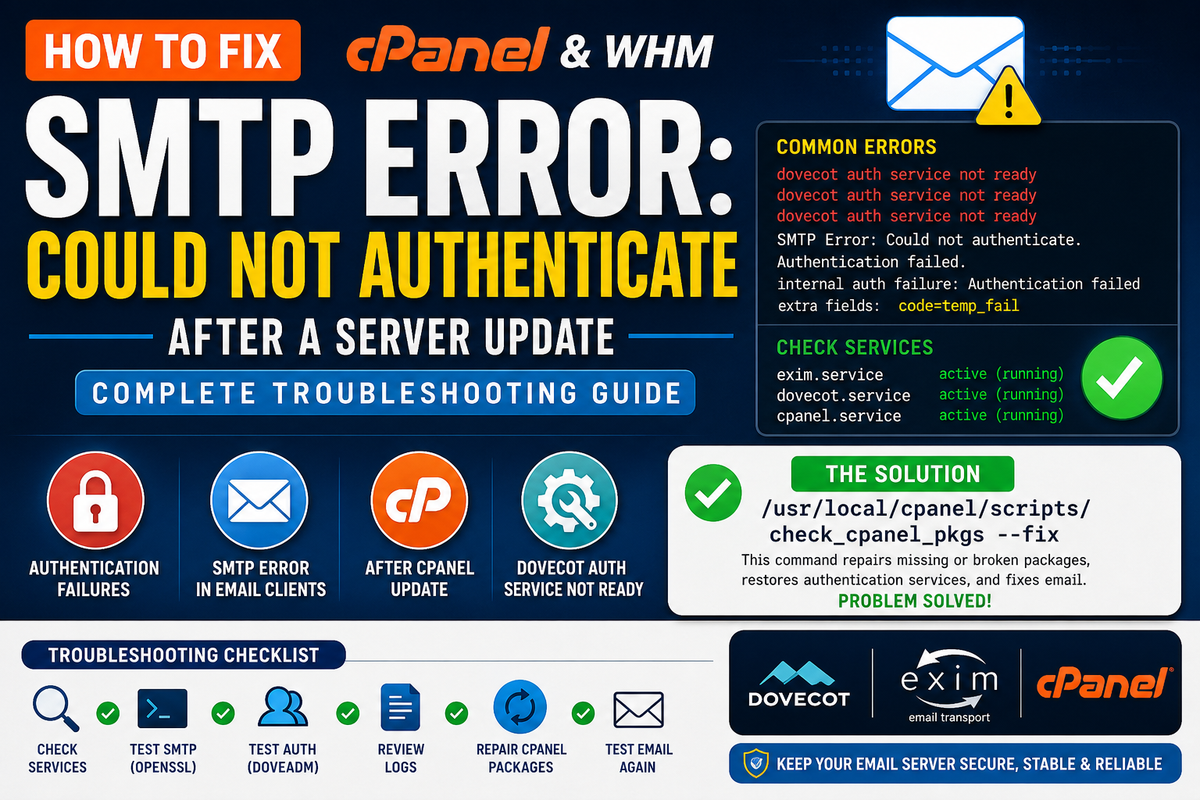
Recently, one of our production cPanel/WHM servers suddenly stopped allowing email clients to authenticate after a system update. Users could receive errors such as:
- SMTP Error: Could not authenticate.
- Authentication failed.
- Internal auth failure.
- Temporary authentication failure (temp_fail).
Outgoing email stopped working from Outlook, Thunderbird, Roundcube, mobile devices, WordPress SMTP plugins, and other applications despite mail services appearing to run normally.
This guide explains the investigation process and the simple command that ultimately resolved the issue.
Symptoms
Users reported:
- SMTP Error: Could not authenticate.
- Email clients repeatedly asking for passwords.
- WordPress SMTP plugins failing authentication.
- Outlook and Thunderbird unable to send email.
- Webmail login failures.
- Incoming authentication failures despite correct passwords.
Initial Service Checks
The first step was confirming that the mail services themselves were running correctly.
Exim
Checking the Exim service showed it was active.
systemctl status exim
SMTP over SSL also responded correctly.
openssl s_client -connect localhost:465 -crlf
The server advertised authentication mechanisms:
250-AUTH PLAIN LOGIN
This confirmed SMTP itself was operational.
Dovecot
Dovecot also appeared healthy.
systemctl status dovecot
However, authentication testing failed.
doveadm auth test support@example.com 'password'
Result:
internal auth failure
code=temp_fail
This indicated the authentication backend was failing rather than the user's password being incorrect.
Examining the Logs
Dovecot logs contained repeated errors similar to:
dovecot auth service not ready
and
Weak password scheme 'DES-CRYPT' used and refused
Although these messages suggested password issues, inspection of the mailbox password database confirmed that modern SHA-512 hashes were already in use.
Additional Investigation
Several troubleshooting steps were performed.
1. Verified mailbox password hashes
Mailbox shadow files showed SHA-512 encrypted passwords.
$6$...
No legacy DES hashes were present.
2. Reset mailbox passwords
Using the UAPI:
uapi --user=username Email passwd_pop
Passwords updated successfully.
Authentication still failed.
3. Verified SMTP Authentication
SMTP advertised:
AUTH LOGIN
AUTH PLAIN
Authentication mechanisms were available.
4. Investigated Dovecot Plugins
An orphaned Imunify360 authentication plugin remained on the server after an earlier uninstall.
lib_imunify360.so
The obsolete module generated compatibility warnings after Dovecot upgrades.
Although removing the orphaned plugin eliminated one error, authentication continued to fail.
5. Checked cPanel Authentication
The cPanel authentication daemon repeatedly logged:
dovecot auth service not ready
At this point the issue clearly pointed toward an incomplete or inconsistent cPanel package installation rather than mailbox corruption.
The Solution
The issue was resolved by repairing all installed cPanel packages.
Simply run:
/usr/local/cpanel/scripts/check_cpanel_pkgs --fix
The script automatically:
- Repaired damaged packages
- Reinstalled missing components
- Corrected mismatched binaries
- Restored Dovecot integration
- Repaired authentication components
After completion, email authentication immediately began working again.
No mailbox recreation was required.
No password resets were required.
No Dovecot reinstallation was necessary.
Recommended Follow-Up
After repairing packages, restart mail services.
/usr/local/cpanel/scripts/restartsrv_dovecot
/usr/local/cpanel/scripts/restartsrv_exim
/usr/local/cpanel/scripts/restartsrv_cpsrvd
Then verify:
doveadm auth test user@example.com 'password'
Authentication should now succeed.
Why This Happens
During major cPanel or operating system updates:
- Dovecot libraries may change.
- Authentication modules may become incompatible.
- Package installations may not complete successfully.
- Core mail authentication services can become inconsistent.
Even though Exim and Dovecot appear to be running normally, the underlying authentication layer may fail internally, producing misleading SMTP authentication errors.
Preventive Maintenance
After every major cPanel update:
/usr/local/cpanel/scripts/check_cpanel_pkgs --fix
This simple maintenance command verifies package integrity and repairs inconsistencies before they cause service outages.
Administrators should also:
- Review Dovecot logs.
- Review Exim logs.
- Test SMTP authentication.
- Test IMAP and POP3 logins.
- Remove obsolete third-party plugins after uninstalling security software.
- Keep cPanel packages fully synchronized.
Troubleshooting Checklist
If you encounter SMTP authentication failures after a server update:
- Verify Exim is running.
- Verify Dovecot is running.
- Test SMTP with OpenSSL.
- Test authentication using
doveadm auth test. - Inspect
/usr/local/cpanel/logs/error_log. - Review Dovecot logs.
- Check for orphaned authentication plugins.
- Verify mailbox password hashes.
- Repair cPanel packages.
Finally, execute:
/usr/local/cpanel/scripts/check_cpanel_pkgs --fix
In many cases, this single command restores the entire mail authentication subsystem.
=======================
SMTP authentication failures after a cPanel update can appear intimidating because every visible mail service may seem healthy while authentication continues to fail.
The key lesson is to distinguish between a password problem and an authentication subsystem problem. When logs repeatedly report "dovecot auth service not ready" or authentication returns temp_fail, repairing the cPanel package installation should be one of the first corrective actions.
In our case, a single package repair restored full functionality without rebuilding mailboxes, reinstalling Dovecot, or reconfiguring Exim, saving hours of unnecessary troubleshooting.