Fixing a Stuck Sole Proprietor Resignation in Kenya BRS: How to Resolve the "Resignation" Tab Issue

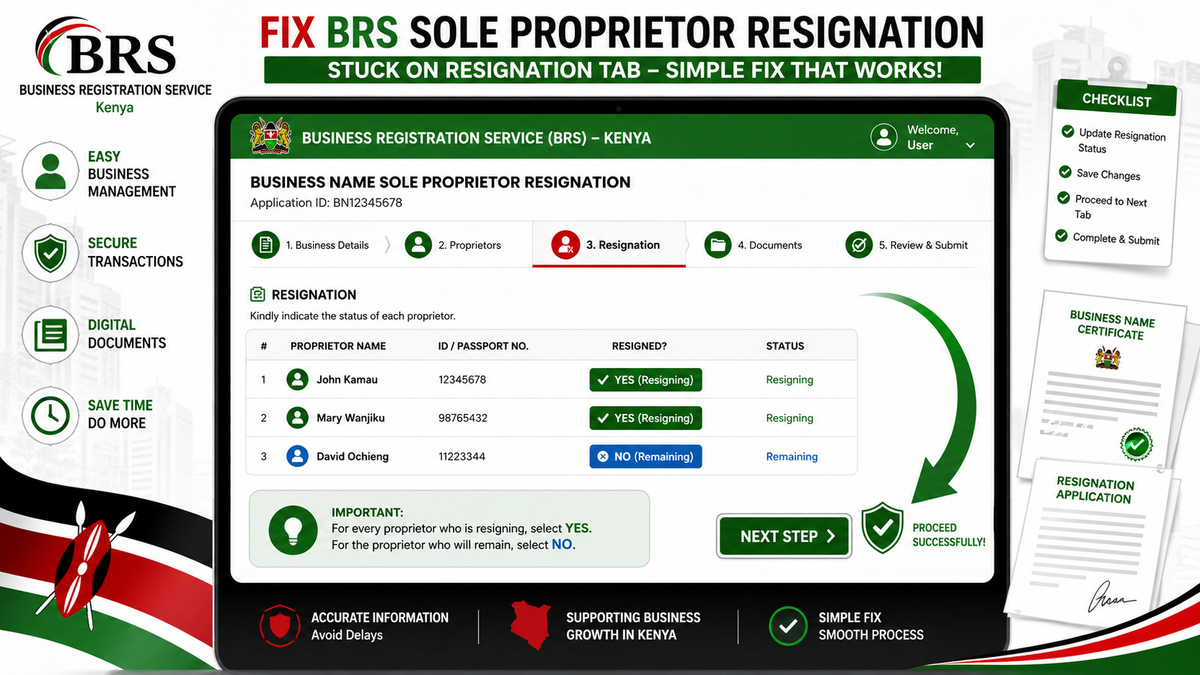
The Kenya Business Registration Service (BRS) portal has significantly simplified business registration and management. However, many sole proprietors encounter a frustrating issue where a Business Name (BN) Sole Proprietor Resignation application becomes stuck at the Resignation tab, preventing submission or progression to the next stage.
Fortunately, in many cases, the solution is surprisingly simple.
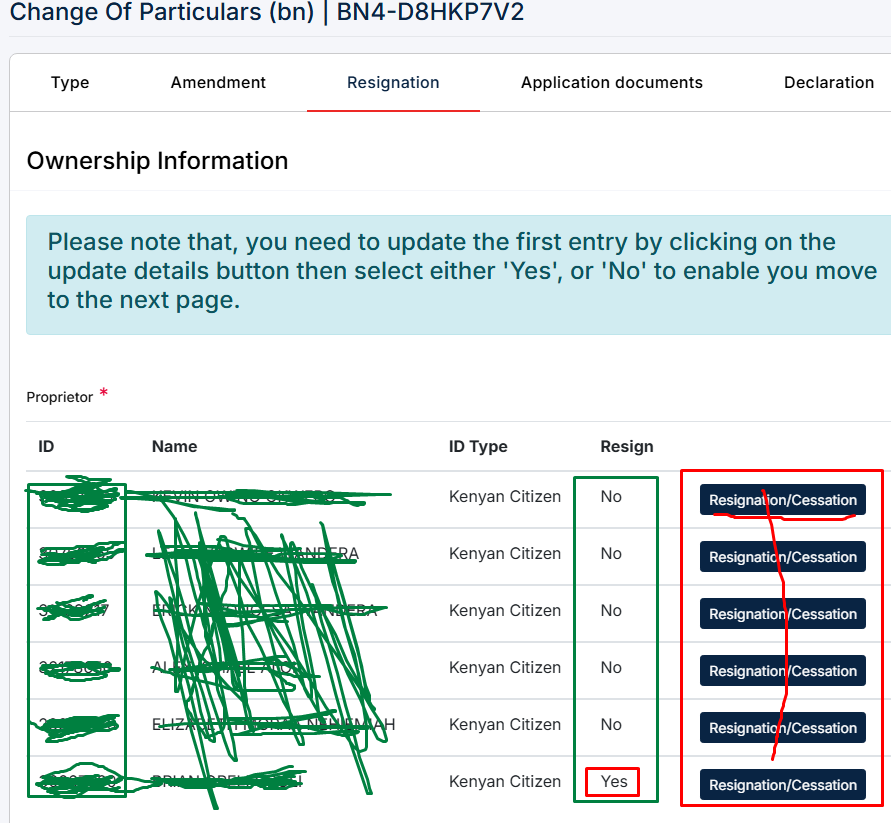
Understanding the Problem
When processing a Business Name Sole Proprietor Resignation, the portal requires you to specify:
- Which proprietor(s) are resigning
- Which proprietor(s) are remaining
Many applicants mistakenly mark the wrong options, causing the application to fail validation silently. Instead of displaying a clear error, the system simply refuses to proceed from the Resignation tab.
Why This Happens
The BRS system validates that:
- Every proprietor leaving the business is correctly marked.
- At least one proprietor remains if the business is to continue.
- If the business is closing completely, all resignations must be consistent with the selected application type.
Incorrect selections create conflicting ownership information.
The Correct Fix
The solution is straightforward.
Rule
For every proprietor who is resigning, set:
Resigned = YES
For the proprietor(s) who will continue owning the business, set:
Resigned = NO
That's it.
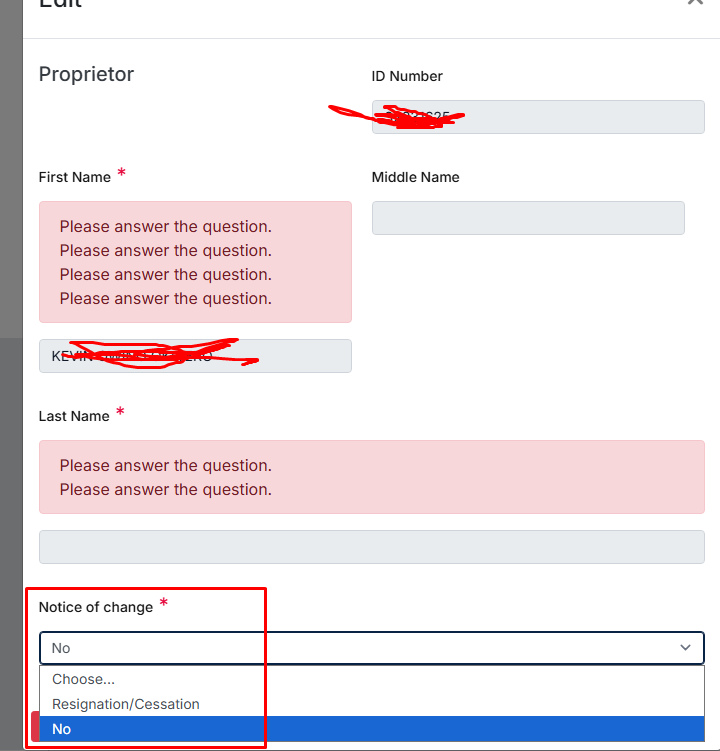
Example 1: Two Proprietors
Suppose a business has:
- John
- Mary
John is leaving while Mary remains.
| Proprietor | Resigned |
|---|---|
| John | YES |
| Mary | NO |
The application should now proceed successfully.
Example 2: Three Proprietors
Business owners:
- Alice
- Brian
- Carol
Alice and Brian are leaving.
Carol remains.
| Proprietor | Resigned |
|---|---|
| Alice | YES |
| Brian | YES |
| Carol | NO |
This satisfies the system validation.
Example 3: Sole Proprietor Changing Ownership
If a proprietor is resigning because ownership is changing, ensure:
Current Owner:
| Proprietor | Resigned |
|---|---|
| Current Owner | YES |
Incoming proprietor should be added according to the relevant BRS process if required.
Common Mistakes
Many applications become stuck because users accidentally:
❌ Set everyone to NO
❌ Set everyone to YES when one owner should remain
❌ Forget to update one proprietor
❌ Save without confirming each proprietor's resignation status
❌ Assume the portal automatically identifies the remaining proprietor
Step-by-Step Fix
Step 1
Open your resignation application.
Step 2
Navigate to the Resignation section.
Step 3
Locate every listed proprietor.
Step 4
For every proprietor leaving the business:
Select
YES
Step 5
For every proprietor staying in the business:
Select
NO
Step 6
Save the changes.
Step 7
Proceed to the next tab.
In most cases, the application should now move forward without getting stuck.
If the Application Still Won't Proceed
If updating the resignation statuses doesn't resolve the issue, try the following:
- Refresh the page and reopen the application.
- Clear your browser cache.
- Use Google Chrome or Microsoft Edge.
- Log out and sign back in.
- Ensure all mandatory sections are completed.
- Verify there are no duplicate proprietor entries.
- Confirm all required documents have been uploaded.
- Check for pending validation messages in other tabs.
Best Practices Before Submission
Before submitting your resignation application, verify:
- ✓ Every resigning proprietor is marked YES
- ✓ Every remaining proprietor is marked NO
- ✓ Names exactly match the registered records
- ✓ All mandatory documents are uploaded
- ✓ Contact details are current
- ✓ The application has been saved after making changes
Frequently Asked Questions
Why is the "Next" button not working?
This is usually because the proprietor resignation statuses are inconsistent or incomplete.
Can I mark every proprietor as "YES"?
Only if the specific BRS process and application type support all proprietors leaving. Otherwise, one or more proprietors must remain and be marked NO.
Does refreshing the page fix the issue?
Refreshing alone rarely solves the problem if the resignation statuses are incorrect. Update the resignation selections first, save the application, and then try again.
What if I accidentally selected the wrong option?
Simply edit the application, correct the selections, save, and continue.
========================
A Business Name Sole Proprietor resignation application getting stuck on the Resignation tab is often caused by incorrect resignation status selections rather than a system failure. The fix is simple but easy to overlook:
- Set "YES" for every proprietor who is resigning.
- Set "NO" for every proprietor who will remain.
Taking a moment to verify these selections can save hours of frustration and allow your BRS application to proceed smoothly.