Fixing the Ghost “Super Editor Role Does Not Exist” Migration Error

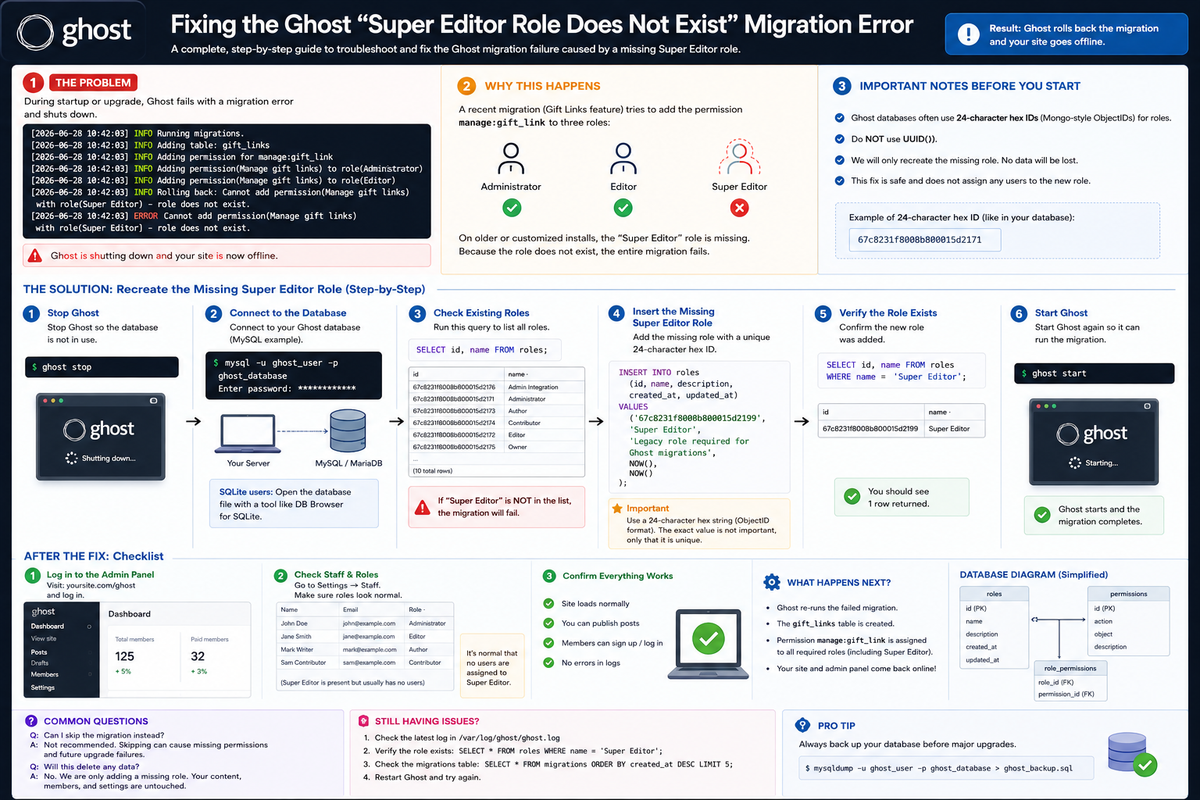
If your Ghost site suddenly went offline during an upgrade and the logs screamed:
Cannot add permission (Manage gift links) with role (Super Editor) – role does not exist
you’re not alone. This is a known migration edge case that appears during newer Ghost upgrades, especially on older installations.
The good news?
✔ No data loss
✔ No reinstall needed
✔ Fixable in minutes
Let’s walk through it calmly.
The Symptoms
You may notice:
- Ghost refuses to start
- The admin panel is inaccessible
- Logs show a rollback during migration
- The site goes offline immediately after startup
Typical log output looks like this:
ERROR Cannot add permission(Manage gift links) with role(Super Editor) - role does not exist
WARN Ghost is shutting down
WARN Your site is now offline
Why This Happens
During recent updates, Ghost introduced Gift Links, which come with new permissions.
While applying the database migration, Ghost attempts to assign the permission:
manage:gift_link
to the following roles:
- Administrator
- Editor
- Super Editor
On many older Ghost installs, the Super Editor role was never created, so the migration fails and Ghost rolls everything back.
Ghost migrations are transactional by design. If one step fails, everything stops.
Important Note Before Fixing
Ghost databases often use 24-character hex IDs for roles, not UUIDs.
That means:
❌ Do not use UUID()
✅ Use a Mongo-style ObjectID string
The Correct and Safe Fix
We will recreate the missing role only.
No users, permissions, or content will be modified manually.
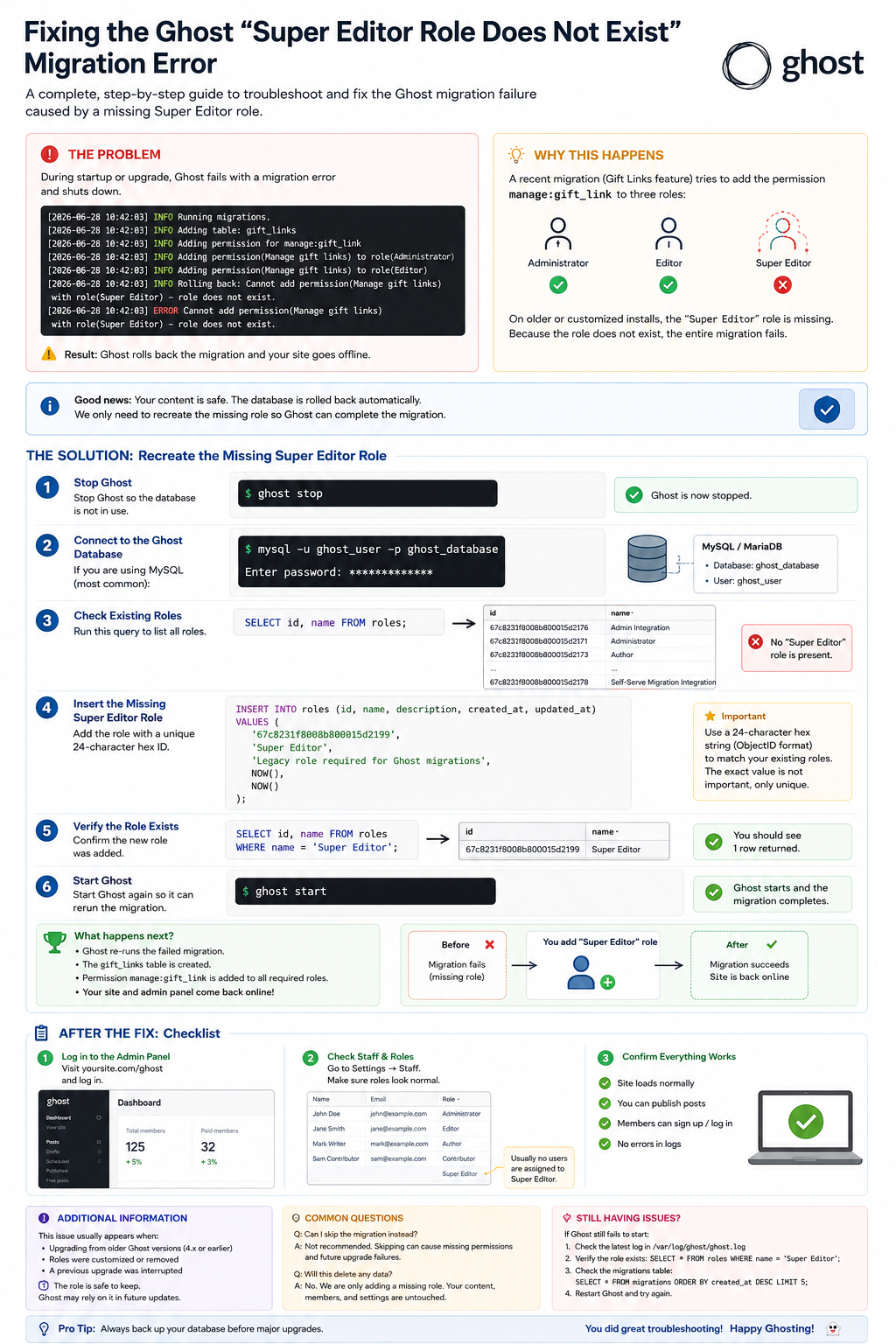
Step 1: Stop Ghost
ghost stop
Step 2: Open the Ghost database
If you’re using MySQL:
mysql -u ghost_user -p ghost_database
Step 3: Confirm the role is missing
SELECT id, name FROM roles;
If Super Editor is not listed, proceed.
Step 4: Insert the missing role
Run the following SQL:
INSERT INTO roles (id, name, description, created_at, updated_at)
VALUES (
  '67c8231f8008b800015d2199',
  'Super Editor',
  'Legacy role required for Ghost migrations',
  NOW(),
  NOW()
);
The ID can be any unique 24-character hex string.
Step 5: Verify the role exists
SELECT id, name FROM roles WHERE name = 'Super Editor';
You should see exactly one row.
Step 6: Start Ghost again
ghost start
At this point:
- The migration reruns
- Gift Links tables are created
- Permissions are assigned
- Ghost stays online 🎉
After the Fix: What to Check
Once Ghost is running:
- Visit
/ghost - Go to Settings → Staff
- Confirm:
- No users are assigned to Super Editor unintentionally
- Existing roles behave normally
You can safely leave the Super Editor role in place. Future upgrades may expect it again.
Why Not Skip the Migration?
Some guides suggest manually marking migrations as completed.
This is risky because:
- Permissions may be missing
- Future updates may fail harder
- Debugging becomes painful later
Creating the expected role is the cleanest and safest solution.
Round-up
This issue usually appears when:
- Upgrading from older Ghost versions
- Migrating long-running sites
- Using customized or trimmed role setups
Once fixed, Ghost upgrades normally going forward.