Troubleshooting MariaDB 11.4 Repository 404 Errors on AlmaLinux 8.10

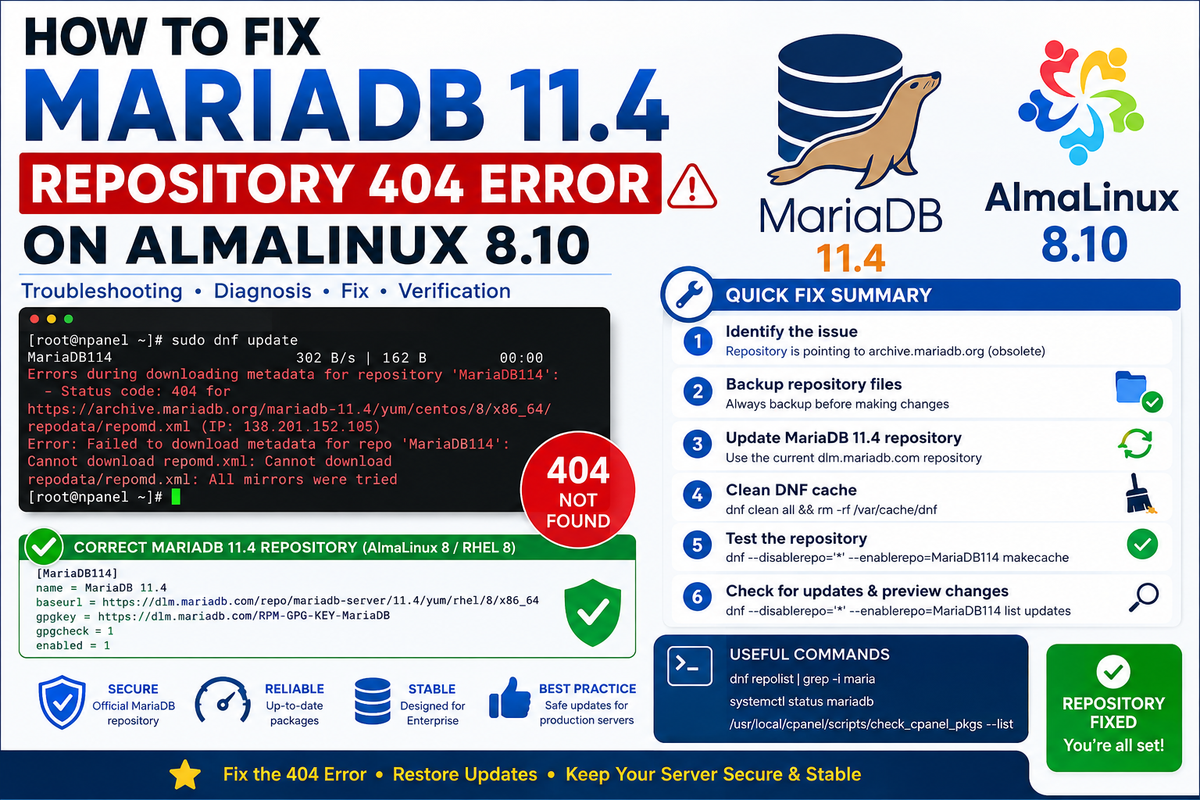
A broken MariaDB repository can cause dnf update to fail with errors such as “Status code: 404”, “Failed to download metadata”, and “Cannot download repodata/repomd.xml.” This guide explains how to diagnose and safely repair the problem on an AlmaLinux 8.10 server running MariaDB 11.4.
The Problem
A typical failure looks like this:
MariaDB114  302 B/s | 162 B
Errors during downloading metadata for repository 'MariaDB114':

Status code: 404 for
https://archive.mariadb.org/mariadb-11.4/yum/centos/8/x86_64/repodata/repomd.xml

Error: Failed to download metadata for repo 'MariaDB114':
Cannot download repomd.xml: All mirrors were tried
The important clue is the 404 HTTP status.
A 404 means the server was reached, but the requested repository path no longer exists at that location. In this case, the repository configuration was pointing to an obsolete archive.mariadb.org path.
Environment Used
The troubleshooting process applies particularly well to servers using:
- AlmaLinux 8.x
- MariaDB 11.4
- cPanel
- DNF/YUM
- x86_64 architecture
For example:
AlmaLinux release 8.10 (Cerulean Leopard)
The installed MariaDB packages may look like:
MariaDB-common-11.4.12-1.el8.x86_64
MariaDB-shared-11.4.12-1.el8.x86_64
This is important because MariaDB is already installed, so the goal is to repair the repository rather than unnecessarily reinstalling or removing database packages.
1. Check the Operating System
Start by identifying the exact operating system:
cat /etc/redhat-release
For this example:
AlmaLinux release 8.10 (Cerulean Leopard)
You can also run:
cat /etc/os-release
2. Check the Installed MariaDB Packages
Run:
rpm -qa | grep -i mariadb
Example:
cpanel-mariadb-connector-3.3.15-2.cp130~el8.x86_64
cpanel-mariadb-connector-devel-3.3.15-2.cp130~el8.x86_64
MariaDB-common-11.4.12-1.el8.x86_64
MariaDB-shared-11.4.12-1.el8.x86_64
This tells you that MariaDB 11.4 packages are already installed.
Do not uninstall MariaDB simply because the repository is returning a 404.
The repository and installed database are two different things.
3. Find the Broken Repository Configuration
Search the repository configuration:
grep -Rni "MariaDB114\|archive.mariadb.org" /etc/yum.repos.d/
A broken configuration might show:
/etc/yum.repos.d/MariaDB114.repo:1:[MariaDB114]
/etc/yum.repos.d/MariaDB114.repo:2:name = MariaDB114
/etc/yum.repos.d/MariaDB114.repo:3:baseurl = https://archive.mariadb.org/mariadb-11.4/yum/centos/8/x86_64
/etc/yum.repos.d/MariaDB114.repo:4:gpgkey=https://archive.mariadb.org/PublicKey
The problem is the obsolete archive.mariadb.org repository URL.
4. Back Up the Repository Configuration
Before modifying anything, create a backup:
cp -a /etc/yum.repos.d/MariaDB114.repo \
/etc/yum.repos.d/MariaDB114.repo.bak
If you also have an older MariaDB repository:
cp -a /etc/yum.repos.d/MariaDB1011.repo \
/etc/yum.repos.d/MariaDB1011.repo.bak
This gives you a quick way to restore the previous configuration if necessary.
5. Replace the Broken MariaDB 11.4 Repository
Create a new repository configuration:
cat > /etc/yum.repos.d/MariaDB114.repo <<'EOF'
[MariaDB114]
name = MariaDB 11.4
baseurl = https://dlm.mariadb.com/repo/mariadb-server/11.4/yum/rhel/8/x86_64
gpgkey = https://dlm.mariadb.com/RPM-GPG-KEY-MariaDB
gpgcheck = 1
enabled = 1
EOF
The important change is moving away from:
archive.mariadb.org
and using the current MariaDB repository infrastructure.
6. Clear DNF Cache
Old repository metadata can remain cached, so clean it:
dnf clean all
Then:
rm -rf /var/cache/dnf
You should see something similar to:
22 files removed
The exact number can differ.
7. Test Only the MariaDB Repository
This is a particularly useful troubleshooting technique.
Instead of running a full system update, test the MariaDB repository alone:
dnf --disablerepo='*' --enablerepo=MariaDB114 makecache
A successful result looks like:
MariaDB 11.4  381 kB/s | 804 kB
Metadata cache created.
🎯 This confirms that DNF can now reach the MariaDB repository and successfully download its metadata.
8. Check for Available MariaDB Updates
Do not immediately perform an upgrade.
First see what is available:
dnf --disablerepo='*' --enablerepo=MariaDB114 list updates
This lets you determine whether a newer MariaDB package is actually available.
9. Preview the Complete System Update
On a production server, especially one running cPanel, preview the update first:
dnf update --assumeno
The --assumeno option tells DNF to answer No to the confirmation prompt.
This allows you to inspect the proposed changes without installing them.
Look carefully for:
MariaDB
MySQL
mariadb
mysql
cPanel
PHP
Apache
packages.
10. Check cPanel Package Management
If the server uses cPanel, check the cPanel package state:
/usr/local/cpanel/scripts/check_cpanel_pkgs --list
If cPanel reports package problems, investigate those before blindly forcing package changes.
You can also use:
/usr/local/cpanel/scripts/check_cpanel_pkgs --fix
However, on a production server, review what it reports before making broad package changes.
11. Why the Error Happened
The original configuration referenced:
https://archive.mariadb.org/mariadb-11.4/yum/centos/8/x86_64/
DNF attempted to retrieve:
repodata/repomd.xml
but the server returned:
404
The sequence was therefore:
DNF
 ↓
MariaDB114 repository
 ↓
archive.mariadb.org
 ↓
obsolete repository path
 ↓
HTTP 404
 ↓
repomd.xml unavailable
 ↓
DNF update fails
After correcting the repository:
DNF
 ↓
MariaDB114
 ↓
current MariaDB repository
 ↓
repodata available
 ↓
metadata downloaded
 ↓
DNF can proceed
12. Don't Confuse a Repository Error With Database Failure
A MariaDB repository error does not necessarily mean MariaDB itself is broken.
For example, these two situations are very different:
Repository problem
Failed to download metadata for repo 'MariaDB114'
This concerns package management.
Database problem
Can't connect to local MariaDB server
This concerns the running database service.
If websites, cPanel applications, and databases are working normally, a repository 404 does not by itself indicate database corruption.
13. Verify the MariaDB Service
If you want to verify that the actual database service is running:
systemctl status mariadb
For a quick check:
systemctl is-active mariadb
Expected:
active
You can also check the installed version:
mariadb --version
or:
mysql --version
14. Check the Repository Configuration After Repair
Run:
cat /etc/yum.repos.d/MariaDB114.repo
You should see the new repository configuration rather than the obsolete archive.mariadb.org URL.
You can also check:
dnf repolist | grep -i maria
Expected output should contain something similar to:
MariaDB114
15. If You Still Get a 404
If the repository continues returning a 404, check:
curl -I https://dlm.mariadb.com/repo/mariadb-server/11.4/yum/rhel/8/x86_64/
Also verify DNS:
getent hosts dlm.mariadb.com
And verify HTTPS connectivity:
curl -I https://dlm.mariadb.com/
If HTTPS works but the repository path fails, the repository URL itself needs to be reviewed rather than changing firewall or DNS settings.
16. Avoid These Common Mistakes
❌ Don't remove MariaDB
Don't do this simply because the repository is broken:
dnf remove MariaDB*
That can create a much larger problem.
❌ Don't disable all repositories permanently
Using:
--disablerepo='*'
is useful for testing, but don't permanently disable your system repositories just to make an update succeed.
❌ Don't randomly switch MariaDB versions
If your server is already running MariaDB 11.4, don't downgrade to 10.11 merely because an old MariaDB1011.repo file exists.
❌ Don't blindly run a full upgrade on production
Especially with cPanel, inspect the proposed package changes first.
17. Recommended Troubleshooting Sequence
For future incidents, this compact sequence is useful:
cat /etc/redhat-release

rpm -qa | grep -i mariadb

grep -Rni "MariaDB114\|archive.mariadb.org" \
/etc/yum.repos.d/

cp -a /etc/yum.repos.d/MariaDB114.repo \
/etc/yum.repos.d/MariaDB114.repo.bak

# Repair repository configuration

dnf clean all
rm -rf /var/cache/dnf

dnf --disablerepo='*' \
    --enablerepo=MariaDB114 \
    makecache

dnf --disablerepo='*' \
    --enablerepo=MariaDB114 \
    list updates

dnf update --assumeno
Then, on cPanel:
/usr/local/cpanel/scripts/check_cpanel_pkgs --list
Final Result
In this particular case, the decisive test was:
dnf --disablerepo='*' --enablerepo=MariaDB114 makecache
and the successful response:
MariaDB 11.4  381 kB/s | 804 kB
Metadata cache created.
That means the MariaDB 11.4 repository metadata problem has been resolved. The next step is package-impact inspection before performing the actual server-wide update.