IT Support Service Levels Explained

A Deep Dive into Tier 0, Tier 1, Tier 2, Tier 3, and Tier 4 Support
Modern organizations run on IT. From email and networks to cloud platforms and business applications, technology is the backbone of daily operations. When something fails, the difference between minutes and hours of downtime often comes down to how IT support is structured.
This is where IT service levels, commonly called support tiers, come in.
Rather than throwing every problem at senior engineers, IT teams use a layered support model that routes issues to the right expertise at the right time. This article breaks down each tier in detail, explains how issues flow between them, and shows why this model is essential for scalable, cost-effective IT operations.
What Are IT Support Tiers?
IT support tiers are graduated levels of technical assistance, each designed to handle a specific category of problems based on complexity, impact, and required expertise.
Each tier has:
- Defined responsibilities
- Specific skill requirements
- Clear escalation paths
The goal is simple:
Resolve issues as quickly as possible using the lowest appropriate level of support.
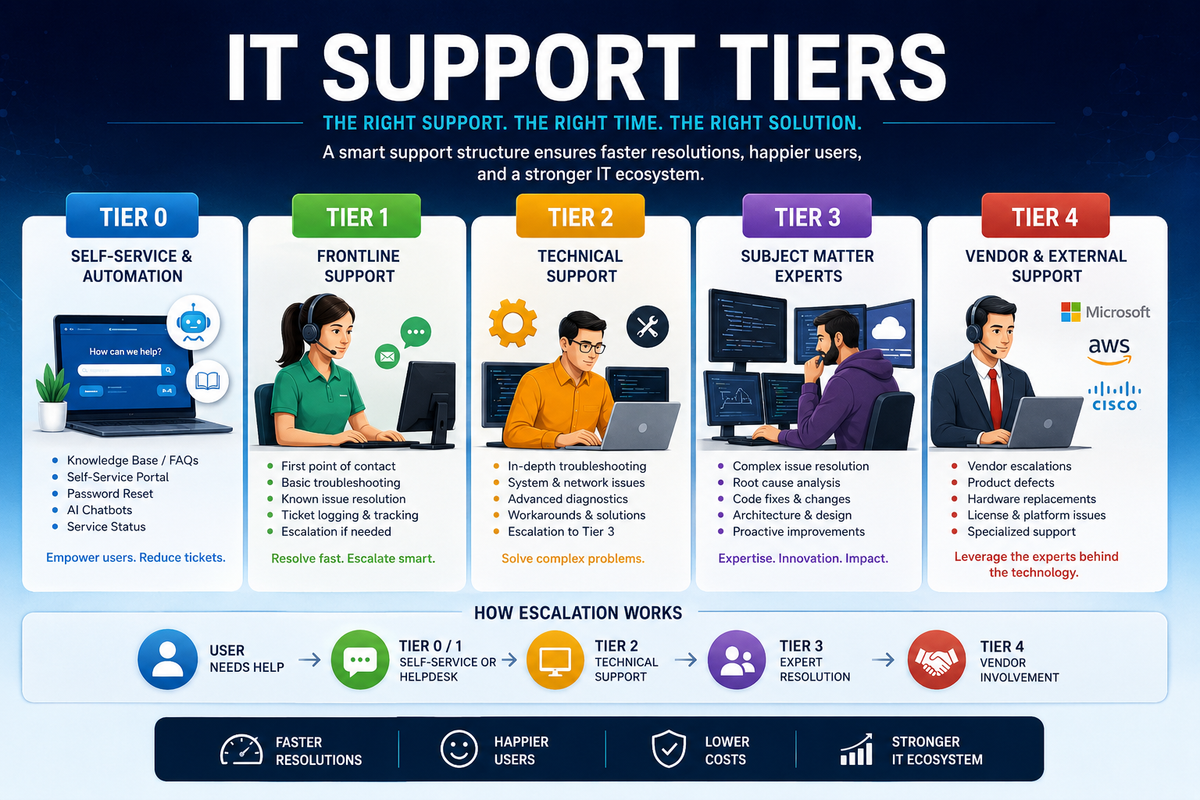
Tier 0: Self-Service, Automation, and Prevention
Support without human interaction
Tier 0 sits quietly in the background, preventing tickets before they are created.
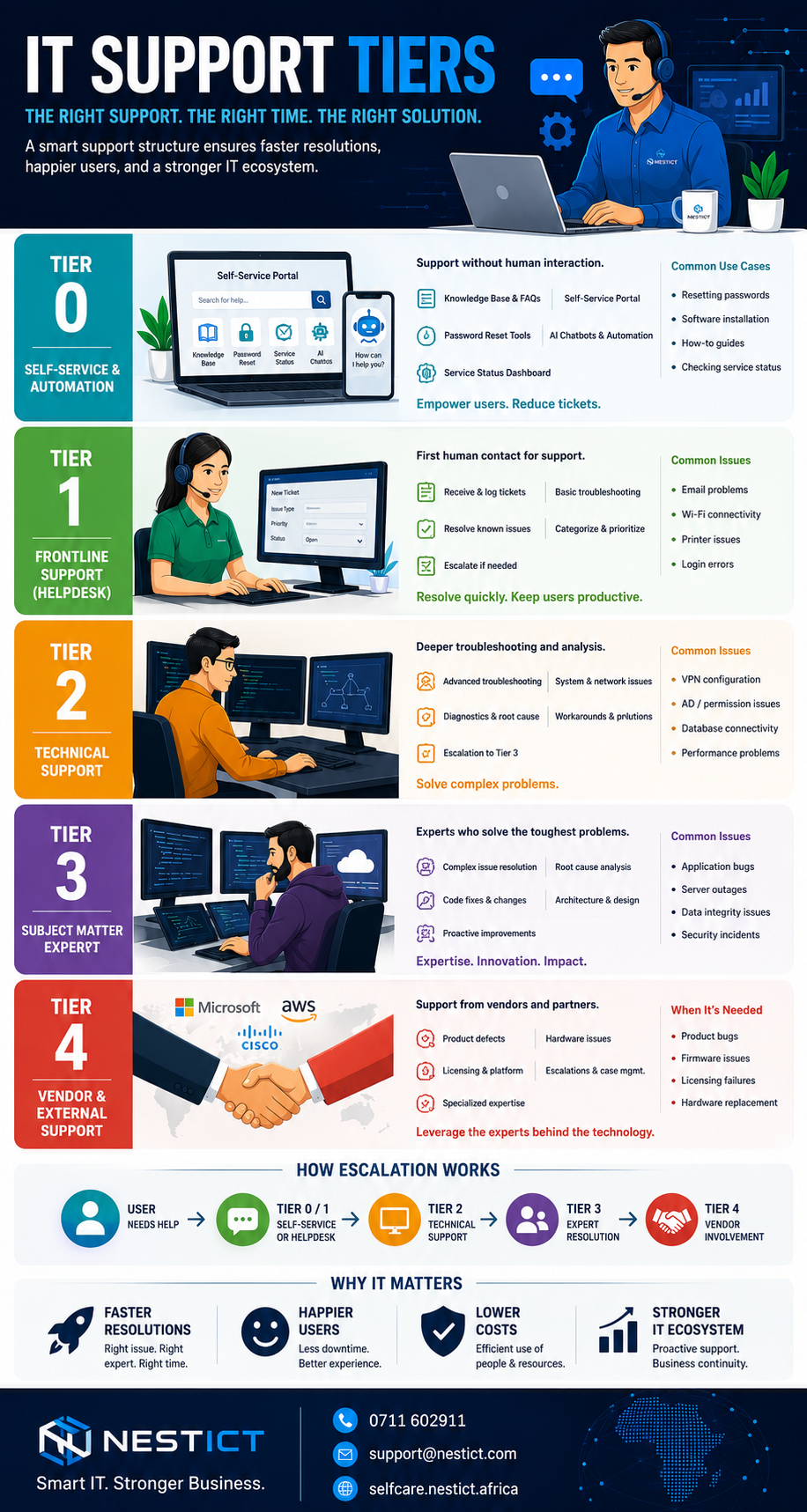
What Tier 0 Includes
- Knowledge bases and FAQs
- Self-service portals
- Automated password resets
- Chatbots and virtual assistants
- System status dashboards
Common Tier 0 Use Cases
- Resetting passwords
- Installing approved software
- Following setup guides for email or VPN
- Checking if a service is down
Why Tier 0 Is Critical
Tier 0:
- Reduces helpdesk workload
- Provides instant answers
- Operates 24/7
- Improves user confidence
In mature IT environments, Tier 0 can eliminate 30–50% of incoming support tickets.
Tier 1: Helpdesk and Frontline Support
The first human response
Tier 1 is the entry point for human support. These agents act as both problem solvers and traffic controllers.
Core Responsibilities
- Receive and log tickets
- Identify the issue category
- Provide basic troubleshooting
- Resolve known and documented problems
- Escalate when necessary
Typical Tier 1 Issues
- Email not sending or receiving
- Printer not responding
- Wi-Fi connectivity problems
- Basic application errors
Skills Required
- Strong communication
- Customer service mindset
- Basic technical knowledge
- Ability to follow standard operating procedures
Success Metric
Tier 1 is judged by:
- First Contact Resolution (FCR)
- Response time
- Ticket accuracy
A strong Tier 1 team keeps users calm and systems moving.
Tier 2: Advanced Technical Support
The problem solvers
When issues exceed scripts and standard fixes, Tier 2 takes over.
What Tier 2 Handles
- Complex software issues
- Network configuration problems
- Server and system errors
- Advanced diagnostics
Typical Roles
- System administrators
- Network technicians
- Application support specialists
Examples of Tier 2 Work
- VPN configuration failures
- Active Directory permission issues
- Database connection problems
- Performance bottlenecks
Key Difference from Tier 1
Tier 2 doesn’t follow scripts.
They analyze, test, and isolate root causes.
Tier 3: Subject Matter Experts and Engineers
Where deep expertise lives
Tier 3 represents the highest level of internal technical expertise.
Responsibilities
- Resolve critical and high-impact incidents
- Fix complex bugs
- Redesign failing systems
- Improve performance and security
Who Works at Tier 3
- Software engineers
- Cloud architects
- Cybersecurity specialists
- Senior infrastructure engineers
Examples of Tier 3 Issues
- Application bugs requiring code changes
- Data integrity issues
- Server outages affecting multiple departments
- Security incidents
Strategic Value
Tier 3 doesn’t just fix problems.
They eliminate root causes and improve system design.
Tier 4: External Vendors and Third-Party Support
The creators of the technology
Tier 4 exists outside the organization.
Who Tier 4 Includes
- Software vendors
- Hardware manufacturers
- Cloud service providers
- Telecom providers
When Tier 4 Is Required
- Product defects
- Firmware bugs
- Licensing failures
- Warranty replacements
Trade-Offs
- Highest expertise
- Limited control
- Slower resolution times
Tier 4 is essential, but it should be used sparingly and strategically.
How Escalation Works in Practice
- User attempts self-service (Tier 0)
- Contacts helpdesk (Tier 1)
- Escalation to technical staff (Tier 2)
- Advanced engineering intervention (Tier 3)
- Vendor involvement if needed (Tier 4)
Each escalation increases cost and expertise.
Why IT Support Tiers Matter
Without structured tiers:
- Senior engineers handle trivial issues
- Response times increase
- Costs spiral out of control
With proper tiers:
- Faster resolution times
- Lower operational costs
- Better user satisfaction
- Clear accountability
Support tiers are not bureaucracy.
They are efficiency in motion.
Choosing the Right Tier Model
Not every organization needs all tiers internally.
- Small businesses may combine Tier 1 and Tier 2
- Growing companies often outsource Tier 3 or Tier 4
- Enterprises usually operate all tiers
The key is clarity, not size.
Great IT support feels invisible.
Problems fade quietly. Work continues uninterrupted.
That invisibility is built on a carefully designed ladder of support tiers, each doing exactly what it was meant to do.
When IT service levels are well defined, technology stops being a liability and becomes a silent partner in growth.